

Mobile Podcast Production Packages
NO STUDIO RENTAL REQUIRED — WE BRING THE PODCAST STUDIO TO YOUR LOCATION.

Turn Any Room Into a Podcast Studio
Your office. Your conference room. Your event venue.
Digibox brings the cameras, microphones, lighting, switching and technical crew to you.
✓ No studio rental
✓ Use your own office/venue
✓ 3-camera PTZ system
✓ Professional microphones
✓ Professional lighting
✓ Technical crew
✓ Live switching available
✓ Livestreaming available
✓ ISO recording available
✓ Suitable for corporate events and conferences
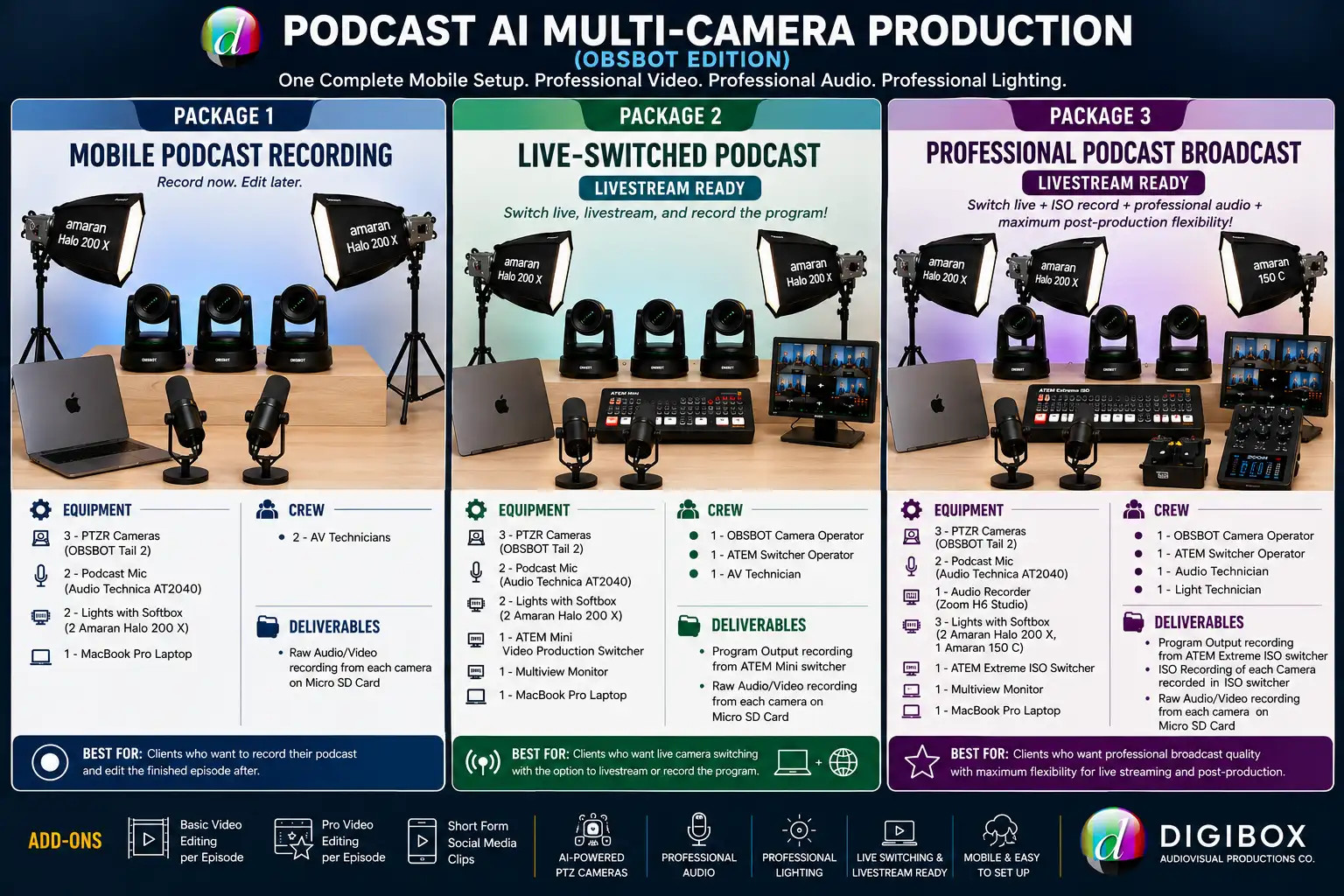
Package 1: MOBILE PODCAST RECORDING
3 cameras + audio + lighting + crew
₱20,000 / 5 hrs (P3,000/succeeding
hour)
For clients who want a professional multi-camera recording without livestreaming.
Package 2: LIVE-SWITCHED PODCAST
3 cameras + ATEM switching + operators + audio + lighting
₱28,000 / 5 hrs
For clients who want a finished program recording and/or are preparing for livestreaming.
Package 3: PROFESSIONAL ISO PODCAST PRODUCTION
3 cameras + live switching + ISO recording + dedicated audio + lighting + livestream-ready workflow
₱35,000 / 5 hrs
For corporate clients and productions requiring more comprehensive technical production.
* 5-hour minimum includes setup
A Complete Professional Podcast Setup — Wherever You Need It.
Bring your podcast to life with a complete 3-camera, AI-powered podcast production system designed for small to medium-sized venues.
The OBSBOT Edition goes beyond simply providing cameras. It brings together professional 4K Live Production AI PTZ cameras, podcast audio, professional lighting, monitoring, production equipment, and technical crew into one integrated and mobile setup.
Everything you need to create a professional-looking and professional-sounding podcast can be deployed at your chosen venue, without the need for a permanent podcast studio or a large production footprint.
Why the OBSBOT Edition?
The OBSBOT Edition combines 4K PTZ Live Production cameras with AI-powered subject tracking and automated camera movement, allowing the cameras to intelligently follow hosts and guests while maintaining professional framing.
The cameras' compact design also allows us to build a full multi-camera podcast setup in a relatively small space, making the system ideal for on-location productions where traditional studio equipment may be impractical.
But the cameras are only part of the production.
A Complete Podcast Production System
Our setup integrates the essential elements of a professional podcast production:
3-CAMERA VIDEO
Three 4K OBSBOT AI PTZ cameras provide multiple angles for a dynamic,
professional-looking podcast.
PROFESSIONAL AUDIO
Dedicated podcast microphones or DJI wireless microphones provide clear and
consistent audio capture for hosts and guests.
PROFESSIONAL LIGHTING
Amaran LED lights with softboxes provide controlled, flattering illumination to
help create a polished studio-style look even in a non-studio environment.
PRODUCTION & MONITORING
A MacBook Pro and professional video production equipment provide camera
control, monitoring, recording, and—depending on the package—live switching and
ISO recording.
TECHNICAL CREW
Our production team handles the technical operation of the cameras, audio,
lighting, and switching according to the package selected.
One Setup. Multiple Production Options.
Depending on the package you choose, your podcast can be produced as a simple recording or expanded into a live production.
RECORDED PODCAST
Capture individual camera angles and audio for editing and post-production.
LIVE-SWITCHED PODCAST
Switch between the three cameras in real time, creating an instant
Program Output that can be recorded or used for projection.
LIVESTREAM-READY PODCAST
The live-switched Program Output can also be used as the video source for livestreaming
to your preferred social media platform. The client provides their own
laptop, internet connection, and livestream account.
PROFESSIONAL ISO PRODUCTION
The professional package records the individual camera feeds (ISO) in
addition to the live Program Output, giving your editor maximum flexibility to
re-edit the episode after recording.
From Recording to Livestreaming — You Choose.
Our podcast packages are primarily designed for recording and post-production, while the live-switching options provide the added flexibility to create a finished program in real time or livestream when needed.
Whether you simply want to record and edit later, produce a live-switched podcast, or have the flexibility to livestream your session, the OBSBOT Edition provides a scalable, professional production solution that can adapt to your content, venue, and production requirements.
Ideal For:
- Podcasts and interview shows
- Corporate podcasts and executive interviews
- Talk shows and panel discussions
- Company and organization content
- Educational and training programs
- Video podcasts and digital content production
- Social media and online content
- Livestreamed discussions and programs
Professional Video. Professional Audio. Professional Lighting. One Complete Mobile Setup.
FAQ
1. Which package is best for us?
MOBILE PODCAST RECORDING
Best for clients who want to record the podcast and edit it afterward.
LIVE-SWITCHED PODCAST
Best for clients who want live camera switching and a ready-to-use Program
Output, with the additional option to livestream.
PROFESSIONAL PODCAST BROADCAST
Best for clients who want live switching, individual ISO camera recordings,
dedicated professional audio, and maximum flexibility for post-production.
In short:
🎥 MOBILE PODCAST RECORDING
Record now. Edit later.
🎬 LIVE-SWITCHED PODCAST
Switch live. Record the program. Livestream when you want.
🎞️ PROFESSIONAL PODCAST BROADCAST
Live switch + ISO record + professional audio + maximum post-production
flexibility.
2. Is video editing included?
No. Video editing is available as an optional add-on.
Clients may choose from:
Basic Video Editing — Per Episode
For straightforward assembly and preparation of the recorded podcast.
Pro Video Editing — Per Episode
For more comprehensive post-production, including enhanced editing, audio
treatment, color correction, graphics, transitions, and other production
enhancements.
Short-Form Social Media Clips
Selected highlights from the full podcast can be edited into short-form content
for social media.
3. Is livestreaming included?
The live-switching packages are livestream-ready, but livestreaming itself is not included as an internet service.
The ATEM switcher provides the live-switched Program Output that can be used as the video source for livestreaming.
The client must provide:
- Their own laptop/computer
- Reliable internet connection
- Their preferred livestreaming platform/account
- Login credentials and streaming access
Examples include Facebook, YouTube, and other supported platforms.
Internet service, internet charges, and the client's livestream account are not included in the package.
4. Can we add video clips, title cards, logos, and graphics during live switching?
Yes, but full GFX and video playback are not included in the standard Podcast Package.
We can accommodate basic graphics and preloaded overlays during the live production. However, more complex graphics, animations, title sequences, and video clip playback require a separate playback system and operator.
What can be included in the standard setup?
We can preload your logos, title cards, and overlay graphics into our ATEM switcher or production computer, subject to the available storage and processing capacity.
Please prepare static overlay graphics in 1920 × 1080 PNG format with a transparent background. This ensures that they can be properly keyed and displayed over the live video.
Video clips cannot be preloaded into the ATEM as overlays and require a separate playback solution.
Why isn't a dedicated GFX and video playback team included?
A dedicated GFX/video playback setup requires more than simply adding another computer. It typically involves a separate computer, playback software, dedicated operator, media preparation, and rehearsal to ensure that clips, graphics, and cues are triggered correctly during the live production.
Including this as a standard service would add another operational role and take our crew's attention away from their primary responsibilities: camera operation, live switching, audio coordination, recording, and overall production reliability.
For clients who require more elaborate graphics or video playback, we therefore offer the following options:
1. Use our MYPIN 4K Media Player
Our package includes a MYPIN 4K Media Player, which can be used to play video clips, photos, and full-frame graphics. It can be connected directly to our switcher and can also operate as a stand-alone playback device, eliminating the need for a dedicated laptop for basic media playback.
2. Provide your own GFX/playback team and equipment
You may bring your own computer, playback system, and operator. We can take their video output and connect it to our live switcher as an additional input.
3. Use your own laptop
For simpler productions, you may provide your own laptop to play video clips and non-overlay graphics. Your laptop output can be fed into our switcher as a video source.
4. Preload your graphics with us
For simple productions, you may send us your logos, title cards, and overlay graphics in advance so they can be prepared and loaded into our production system.
5. Add our dedicated GFX solution
For productions requiring more advanced graphics, overlays, animated elements, or coordinated playback, you can add our Wirecast or H2R GFX setup, which includes an additional laptop/system and operator at an additional cost.
6. Follow our graphic specifications
For overlay graphics that will be keyed over the live camera feed, please prepare files in:
- Resolution: 1920 × 1080
- Format: PNG
- Background: Transparent
- Color mode: RGB
Providing properly formatted graphics in advance helps ensure a smoother and more reliable live production.
Important: Please let us know your GFX and video playback requirements before the production date. Complex playback requirements may require additional equipment, an operator, and rehearsal time.
5. How is the podcast production package charged?
Our podcast production packages are offered on an hourly basis, with a minimum booking of 5 hours.
The first 5 hours constitute the minimum production period, and the applicable hourly package rate is used for any additional hours beyond the 5-hour minimum.
Important: The 5-hour minimum includes the required setup time.
For a typical production:
1 hour — Setup + 4 hours — Podcast Production = 5-hour minimum
If the client requires additional production time beyond the initial 5 hours, the regular hourly rate will apply.
6. Is the setup time included in the 5-hour minimum?
Yes.
The standard setup normally takes approximately 1 hour and is included within the 5-hour minimum.
Basic setup includes:
- Mounting and positioning the OBSBOT cameras
- Connecting and testing the cameras
- Setting up microphones and audio recording
- Setting up the ATEM switcher, when included
- Connecting the monitoring system
- Basic lighting setup
- Camera framing and technical checks
- Recording and signal testing
If additional time is required to fine-tune the lighting, camera positions, framing, or overall look, this can also be accommodated within the 5-hour minimum, subject to the available setup time.
Clients may request adjustments based on their preferred look, while a director or production representative may also provide specific lighting and framing instructions.
For more elaborate setups or major changes to the venue configuration, additional setup time may be required and will be discussed in advance.
7. When does the actual podcast recording start?
The production clock begins with the agreed call time, which includes setup.
For example:
6:00 AM Call Time
→ 6:00–7:00 AM Setup
→ 7:00–11:00 AM Podcast Production
→ 5-hour minimum fulfilled
This allows sufficient time for the crew to properly prepare and test the equipment before recording begins.
8. How do we receive the recorded video and audio files?
The OBSBOT cameras record directly to microSD cards.
After the production, the client may copy the recorded files directly from the camera cards to their own storage device.
The cameras can record in 4K or HD, depending on the selected recording format.
Clients should provide their own:
- External SSD, or
- External hard drive
with sufficient free storage capacity for the recorded files.
Our crew can assist with the file-copying process during pack-up or immediately after the production, depending on the production schedule..
9. How long does it take to copy the OBSBOT camera recordings?
The time required to copy your OBSBOT camera recordings depends on several factors, including the recording format, amount of footage, microSD card speed, card reader, USB connection, and destination drive.
As a general planning guide, the following are typical estimates for 1 hour of footage from one camera:
Recording Approx. File Size Copy to External SSD Copy to Standard HDD
4K ~30–45 GB/hour ~5–10 min ~8–15 min
HD ~10–20 GB/hour ~2–5 min ~4–8 min
These figures are estimated transfer times only. Actual speeds may be faster or slower depending on the specific memory card, card reader, USB interface, computer, and destination drive being used.
What about a 3-camera production?
With three cameras recording simultaneously, the total amount of data generated will be approximately three times that of a single camera.
Example:
If each camera records approximately 40 GB per hour in 4K, three cameras will generate approximately 120 GB of footage per hour of production.
For longer productions, we recommend having a high-capacity external SSD available for faster file transfers and efficient media management. This is especially important when multiple cameras are being recorded simultaneously.
Tip: Transfer times are separate from the actual recording time. For example, a 2-hour production may take considerably less—or more—than 2 hours to copy, depending on the total file size and the speed of the storage system.
10. Can the files be copied immediately after the shoot?
Yes.
File copying can be performed:
Option A — Immediately after the production
The client can copy the files before the crew leaves, subject to available
time.
Option B — During pack-up
File copying can take place while the crew is packing and organizing equipment.
We recommend preparing the client's external storage device before the shoot to minimize delays.
The client is responsible for ensuring that the destination drive has sufficient storage capacity.
11. What about the ISO recordings from the ATEM Extreme ISO?
The Professional Podcast + Live Switcher + ISO package provides additional recordings from the ATEM Extreme ISO.
These may include:
- The live Program Output
- Individual ISO recordings from the three camera inputs
This provides significantly more flexibility for post-production.
Because several video files are being recorded simultaneously, the total amount of data can be substantially larger than the camera recordings alone.
As a general planning estimate, allow approximately 10–20 minutes per hour of production for copying the ATEM recordings to a fast external SSD, depending on the number and size of files and the actual transfer hardware used.
For the Professional package, we recommend that clients provide a high-capacity external SSD.
Actual transfer time will depend on the recording duration, file sizes, SSD speed, USB connection, and computer used for the transfer.
12. Can the cameras record in 4K while using the ATEM switcher?
Yes, but there is an important distinction.
The OBSBOT cameras are capable of recording 4K internally to their microSD cards.
However, the ATEM switcher Program Output is recorded in HD, not 4K.
Therefore, the Professional setup can provide:
OBSBOT Cameras: 4K individual recordings
ATEM Program Output: HD
ATEM ISO Recordings: HD
Livestream: HD
This allows clients to retain high-resolution 4K camera masters for post-production while using the ATEM system for live switching and HD program recording.
13. Can we livestream in 4K?
No.
The livestream workflow provided by the ATEM setup is HD, even though the OBSBOT cameras are capable of recording in 4K.
This is intentional: the 4K camera recordings are retained as high-resolution source files for post-production, while the live-switched Program Output is produced in HD.
14. Can we also receive the audio recordings?
Yes.
Depending on the package selected, audio may be available from the camera recordings, DJI LARK MAX Duo, or the dedicated Zoom H6 Studio.
For the Professional Package, the Zoom H6 Studio provides a separate dedicated audio recording, giving the post-production team greater control over the final sound.
15. How are the Zoom H6 Studio audio files copied?
The Zoom H6 Studio records to a microSD card.
The audio files can be copied from the recorder's microSD card to the client's external storage device.
For professional post-production, we recommend keeping the dedicated H6 Studio audio files together with the corresponding camera and ATEM recordings.
16. How do we copy audio recorded by the DJI LARK MAX Duo?
The DJI LARK MAX Duo recordings can be transferred using a USB cable to a compatible computer.
These recordings can provide an additional audio source for post-production, depending on the configuration used during the production.
17. Do you provide the external hard drive or SSD?
We provide our own SSD storage for recording during the production. However, the client is responsible for providing their own external storage device for receiving and keeping the recorded files.
Our production setup uses dedicated SSD storage for recording the camera footage. These SSDs are part of our recording system and are not included as the client's take-home storage.
After the production, the recorded files can be copied to the client's external SSD or hard drive. The client should therefore provide a suitable storage device with sufficient free capacity for the amount of footage generated.
For multi-camera 4K productions, we strongly recommend a high-capacity external SSD for faster file transfers and more efficient handling of large video files.
Please make sure your external storage has adequate free space and is ready for use before the production begins.
18. Can we request a different camera arrangement?
Yes.
The three-camera OBSBOT setup can be configured according to the venue and the desired style of the podcast.
A typical two-person interview configuration may include:
- Camera 1: Wide/two-shot
- Camera 2: Host/Guest A
- Camera 3: Host/Guest B
Camera positions can be adjusted based on the room layout, seating arrangement, background, lighting, and director's preference.
19. Can the setup accommodate more than two people?
The standard package is designed around a two-person podcast/interview configuration.
Additional guests or panelists may require changes to:
- Microphone requirements
- Camera framing
- Lighting
- Camera positions
- Audio recording
- Crew requirements
- Venue space
Additional equipment or production requirements can be quoted separately depending on the project.
20. Are crew meals included in the package?
No. Crew meals are to be provided by the client during the production.
Because podcast productions can involve early call times and extended production periods, meals should be provided according to the following schedule:
Call time starts at 6:00 AM or earlier
→ Breakfast must be provided
Production is ongoing during lunch
→ Lunch must be provided
Production is ongoing during dinner
→ Dinner must be provided
Pack-up extends beyond 8:00 PM
→ An additional meal must be provided
Meals should be provided for all crew members assigned to the production.
21. Is transportation included in the package price?
No. Transportation is billed separately.
Transportation charges are based on the current prevailing transportation rates at the time of the production.
As a reference, transportation is calculated based on the prevailing rate for a 6-seater vehicle from services such as Grab or other comparable car-hailing/transportation services.
The applicable transportation cost will depend on:
- Pick-up and drop-off location
- Travel distance
- Travel time
- Current transportation rates
- Number of trips required
- Equipment and crew requirements
The final transportation cost will be confirmed with the client prior to the production.